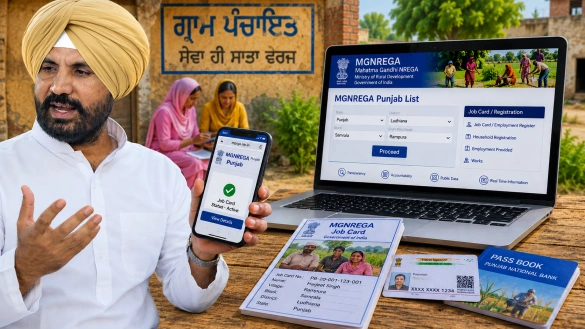
The MGNREGA Punjab list is the official public directory of all registered job card holders in Punjab, available free at nrega.nic.in. To check your name - go to the site, navigate to Gram Panchayat Reports, select Punjab, enter your district, block, and panchayat, and open the Job Card / Employment Register. Click your Job Card number to see your full record and download it as a PDF. Payment status can be tracked through the same portal or the UMANG app. In 2026, Aadhaar e-KYC is mandatory - workers whose Aadhaar is not bank-linked will have wages rejected. The transition to VB-G RAM G happens on 1 July 2026; existing job cards remain valid in the meantime.
Every registered worker under the MGNREGA Punjab list has the right to verify their details, track their payment status, and download their Job Card - all online, free of charge, within minutes. In 2026, the NREGA portal has been updated to reflect the transition to the new VB-G RAM G framework, but the process for checking the MGNREGA Punjab list remains straightforward and accessible to any worker with a mobile phone or internet connection.
This step-by-step guide covers how to check the MGNREGA Punjab list by name, how to perform an MGNREGA job card check, how to verify payment status, and what MGNREGA beneficiary Punjab workers need to know before the scheme's transition on 1 July 2026.
What Is the MGNREGA Punjab List?
The MGNREGA Punjab list is the official public directory of all registered job card holders across Punjab's 23 districts. It is maintained on the NREGA Management Information System (MIS) portal at nrega.nic.in and is updated in real time. Any member of the public can access it - no login is required to view the list.
The list is organised by state, district, block, and Gram Panchayat. For every entry, it shows the Job Card number, the name of the registered household, and the current status of the card. Clicking on any Job Card number opens the full profile of that MGNREGA beneficiary Punjab entry - including name, address, bank details, family members registered, days of work completed, and wages paid.
How to Check Your Name in the MGNREGA Punjab List Online
The following steps guide any MGNREGA beneficiary Punjab worker through the MGNREGA online Punjab portal to check their job card status.
Step 1 - Visit the Official NREGA Portal
Open a browser on any mobile phone or computer and go to: https://nrega.nic.in
This is the only official government portal for the MGNREGA Punjab list. No third-party website is required.
Step 2 - Navigate to Job Card Reports
On the homepage, click on "Login" in the top menu bar. From the dropdown, select "Quick Access", then click on "Panchayats GP/PS/ZP Login". On the next screen, select "Gram Panchayats", then click "Generate Reports".
Step 3 - Select Punjab
A map of India will appear. Click on Punjab from the map or select it from the state list. This opens the Gram Panchayat module for Punjab's MGNREGA online Punjab data.
Step 4 - Enter District, Block, and Panchayat Details
On the next page, select the following from the dropdown menus:
- Financial Year - select 2025–2026 or 2026–2027 as applicable
- District - for example, Ludhiana, Amritsar, Bathinda, or any of Punjab's 23 districts
- Block - the administrative block within that district
- Gram Panchayat - the specific village panchayat
Click the "Proceed" button.
Step 5 - Open the Job Card / Employment Register
The Gram Panchayat Reports page will open. Under the section labelled "R1. Job Card / Registration", click on "Job Card / Employment Register". This displays the complete MGNREGA Punjab list for the selected Gram Panchayat.
Step 6 - Find Your Name and Check Details
The list shows the Job Card number and the registered household name for every MGNREGA beneficiary Punjab entry in that panchayat. Use Ctrl+F (Find) on a desktop or the search function on mobile to search for a name directly.
Once the name is located, click on the Job Card number to open the full record. This displays:
- Registered family members and their details
- Bank account information linked to the card
- Total days of work completed
- Wages credited to date
- Current card status (active, inactive, or pending e-KYC)
Step 7 - Download or Print the Job Card
To download the NREGA job card Punjab, click the "Print" option on the Job Card page and save it as a PDF file. This digital copy is valid for all official purposes.
How to Check MGNREGA Payment Status Online
Beyond the MGNREGA job card check, workers can separately verify whether their wages have been transferred to their bank account. The payment goes through several stages - muster roll closure, Block Development Officer verification, District Programme Coordinator approval, and finally DBT transfer to the worker's account.
To check payment status:
- Visit nrega.nic.in
- Navigate to Reports → Financial Reports → Statement of Fund Utilisation
- Select Punjab, the relevant district, block, and panchayat
- The FTO (Fund Transfer Order) status will show whether payment is pending, processed, or credited
Workers can also check payment status using the UMANG app:
- Download UMANG from the Google Play Store or Apple App Stor
- Log in with a mobile number and OTP
- Search for "MGNREGA"
- Select "Payment Status" and enter the Job Card number
If wages are not credited within 15 days of the muster roll being closed, the MGNREGA beneficiary Punjab is legally entitled to compensation at 0.05 per cent of the unpaid wages per day of delay. Workers facing persistent payment delays can contact the MGNREGA toll-free helpline at 1800-111-555.
Important: Aadhaar e-KYC Is Now Mandatory
In 2026, all MGNREGA online Punjab job card holders are required to complete Aadhaar e-KYC to continue receiving wages through the Aadhaar-Based Payment System (ABPS). Workers whose Aadhaar is not linked to their bank account or whose NPCI mapping is incomplete will find their wage transfers rejected.
To complete e-KYC, workers should visit their Gram Panchayat office or nearest Common Service Centre (CSC) with their Aadhaar card and bank passbook. This is a mandatory requirement before the transition to the new framework on 1 July 2026 and applies to every MGNREGA beneficiary Punjab across all 23 districts.
NREGA Punjab Ludhiana - District-Specific Access
For workers in Ludhiana - one of Punjab's largest and most industrially significant districts - the MGNREGA job card check process follows the same steps as above. After selecting Punjab on the NREGA portal, workers select Ludhiana as the district, then choose the relevant block and Gram Panchayat to access the NREGA Punjab Ludhiana list for their village.
Amarinder Singh Raja Warring, one of the leading Congress figures in Punjab and theMember of Parliament from Ludhiana, has consistently raised concerns in Parliament about timely wage disbursement and proper MGNREGA implementation across the district. His advocacy - including a public protest in December 2025 demanding effective implementation, timely wage payments, and adequate fund allocation - reflects the importance of this scheme to Ludhiana's rural households. Read more abouthis campaigns and advocacy work or explore the fullarticles section for more updates.
Join the Movement
Punjab's rural workers are the backbone of this state. When their wages are delayed, when their job cards are inactive, when the scheme meant to protect them is weakened - they deserve a voice that speaks up without waiting to be asked.
Amarinder Singh Raja Warring has taken that fight to Parliament and to the streets. If you believe every MGNREGA beneficiary Punjab deserves fair wages, a working job card, and a government that is accountable to its workers - stand with Punjab.